

Omnichannel chats
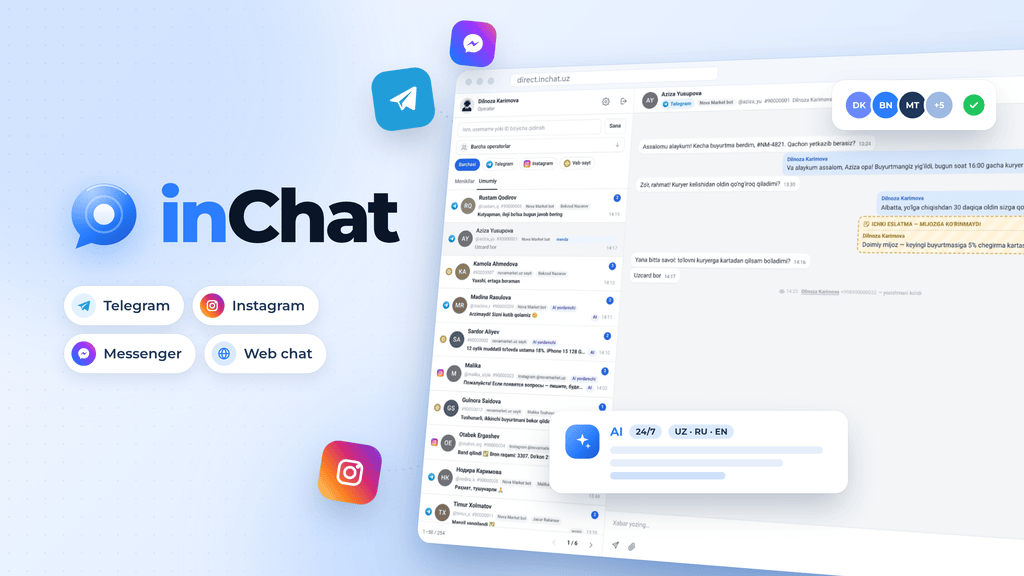
Omnichannel chats: all messengers in one window. Let’s examine an omnichannel chat using the inChat system as an example.
inChat is a multichat system that brings Telegram, Instagram, Facebook and website chat into one window, with an operator team, an AI assistant, CRM integrations and analytics.
inChat is a multichat system — a platform that brings all of your customer conversations into a single window. Messages from Telegram, Instagram, Facebook Messenger and your website chat land in one shared panel, your team of operators replies right from there, and an AI assistant handles routine questions on its own around the clock. It runs in the browser, so there is nothing to install.
Customers today write to a business wherever it suits them: some message the Telegram bot, some use Instagram Direct, others the chat on the website. Logging into every network separately takes time, messages get lost, the password to a single account ends up shared across the whole team, and nobody can tell who replied, when, or what they said. inChat solves exactly this problem.
Channels you can connect
Telegram bot — enter the bot token and every message sent to the bot appears in the panel. You can connect several bots and manage them all from one place.
Telegram profile — connect the company's regular Telegram account through Telegram Business. Customers keep writing to your account as usual, while replies are sent from the inChat panel.
Instagram — Direct messages, customer reactions, photos and videos. The account connects with a single click.
Facebook Messenger — messages sent to your Facebook Page.
Website widget — add one line of code to your site and live chat is ready. Before the conversation starts, the widget asks the visitor for their name and phone number, so contact details arrive with every request. The operator sees which page of the site the customer wrote from, and both sides can exchange files.
If you need a different channel, we will connect it separately for your use case. Connecting the first channel usually takes about 5 minutes; channels can be paused temporarily, and their connection status is always visible.
Unified inbox
Conversations from every channel sit in one list, each marked with its channel icon. Operators don't have to think about which messenger a message came from — they simply reply. Messages appear in real time, without reloading the page.
You can filter conversations by channel, operator and date, search by name, username or ID, and find a specific message inside a conversation. An unread counter makes sure no customer is left without an answer. In the panel you can send and receive photos, videos, voice messages and documents, record a voice message right in the window, add emoji and reply to a specific message. If a customer edits a message, the previous version is kept as well.
Operator team and roles
The company owner and every operator sign in with their own login and their own permissions — no more handing one account password to the whole team. The manager adds operators, temporarily deactivates them or resets their passwords.
Each new request is automatically assigned to the least busy operator, so the workload is spread evenly across the team. An operator can take a conversation, transfer it to a colleague or hand it over to the AI assistant. Inside a conversation, operators can leave internal notes for each other that the customer never sees. Conversations that have been inactive for a long time close automatically, keeping the list tidy.
AI assistant
The inChat AI assistant replies on behalf of your company — politely, warmly and 24/7. You give it the company name, the bot's name, information about the company, reply rules and contact details. Then you upload documents to the knowledge base: prices, addresses, delivery terms, working hours and answers to other common questions.
The AI answers only from the information you provide and never makes things up. If it doesn't know the answer, it politely explains this to the customer and hands the conversation to an available operator. The operator sees the full history; once they take over, the AI stays silent, and the conversation can be handed back to the AI at any time.
The AI speaks Uzbek (both Latin and Cyrillic script), Russian and English, replying in whatever language the customer writes in. It works the same way in Telegram, Instagram and the website widget. Questions the AI couldn't answer go into a separate list, and each one can be added to the knowledge base in one click — so the assistant gets smarter over time. Before going live, you can try out its settings in a dedicated test window. For online stores, the AI can be connected to the product catalog: it finds the right product and tells the customer its price, stock level and specifications.
Analytics and activity history
Managers see the whole team at a glance: total, open and closed conversations, operator workload, channel activity, how many questions came in and how many of them the AI answered. Every action — who took a conversation, who it was transferred to, which message was edited — is recorded in the history. This makes it easy to monitor service quality and quickly resolve disputes.
Integrations
inChat works alongside the systems your company already uses. With amoCRM you can create a contact and a deal in one click; with Bitrix24 you can send leads straight into the right pipeline. An API and webhooks pass data to your own systems. We also connect inChat with 1C and ERP systems for orders and customer data, link call history from your telephony to conversations, and integrate with your company's internal software. Need a custom channel, CRM, report or automation? Describe the task and our developers will build it.
Data retention
Messages, photos, videos and files are kept for 30 days from the day they were sent. That doesn't mean "everything is wiped after 30 days": each message counts its own period, only messages older than 30 days are removed each day, and the last 30 days of history are always at hand. Your account, operators, channels, settings and AI knowledge base are never deleted. If you need longer storage, retention can be extended to 90 days, 1 year or unlimited. Access to specific conversations can also be restricted to the employees who need it.
Security
Bot and account tokens are stored encrypted. Every user can see their active sessions and sign out of an unwanted device or of all devices at once. Panel access is role-based: an operator sees only what they are allowed to see.
Who inChat is for
Any business whose customers write to it: retail and online stores, services, education centers, clinics, logistics, government organizations and more. The system fits anything from a single operator to a team of hundreds, and lets you run any process — sales, support, bookings, orders or consultations — in one window.
How to get started
Leave a request on inchat.uz and a manager will contact you within 15 minutes. Together we connect your channels, you add your operators and they can start working right away, and we fill in the company details and knowledge base for the AI assistant with you. Setup, training and ongoing support are free, and you can try the system free for 14 days.
The result: no customer message gets lost, replies get faster, the team's work becomes transparent, and the AI keeps customers from waiting even at night and on weekends. Learn more at inchat.uz.
Start Your Project